Dolores M. Bernal - Senior Technical Writer

Portfolio Certificates Recommendations Resume

Hire The Tech Writer With The CySA+ Cert

By Dolores M. Bernal, Cybersecurity Tech Writer

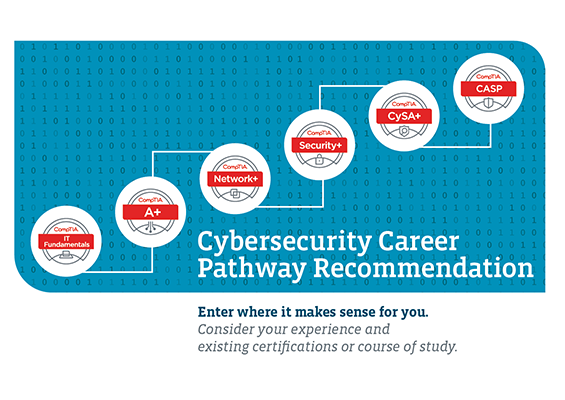
The field of cybersecurity is rapidly evolving and requires professionals with the latest skills and knowledge to protect against a wide range of threats. With cyberattacks becoming more complex, the need for cybersecurity certifications has increased to validate skills and knowledge. Two of the most popular CompTIA certifications are the Security+ and CySA+ certifications, but which one reflects a technical writer’s expertise best?

When I started my cybersecurity career, I decided to go for the CySA+ certification instead of the one most recommended for recent graduates: Security+. The main reason why I wanted a CySA+ is because I felt that my Caltech program had prepared me for a career that required more knowledge and skills than a job that requires only a Security+ certification.

Some recruiters may not know that a CySA+ is more advanced than a Security+ certification and a few times, I’ve seen it misspelled on job descriptions as “CISA,” which is not a certification, but the acronym for the Cybersecurity and Infrastructure Security Agency.

So, What is CompTIA CySA+?

CompTIA CySA+ is a certification that validates a professional’s skills and knowledge in cybersecurity analytics and threat detection. The certification is designed for IT professionals who are responsible for identifying and responding to cybersecurity threats. The certification covers the latest cybersecurity trends, tools, and techniques to identify and mitigate cyber threats. The certification validates skills such as threat management, vulnerability management, incident response, and compliance.

What is Security+?

CompTIA Security+ is a certification that validates a professional’s skills and knowledge in IT security. The certification is designed for IT professionals who are responsible for securing networks, devices, and applications. The certification covers a wide range of security topics, including network security, compliance, access control, and cryptography.

Key Differences between CySA+ and Security+

The CySA+ and Security+ certifications differ in terms of their content, focus, and difficulty level. Here are some key differences:

  1. Focus

The CySA+ certification focuses on cybersecurity analytics and threat detection, while Security+ certification covers a wide range of security topics, including network security, compliance, access control, and cryptography. The CySA+ certification is more specialized and focuses on a narrower set of skills, while Security+ certification covers a broader range of topics.

  1. Difficulty Level

The CySA+ certification is considered more difficult than Security+ certification because it requires more specialized knowledge and skills. The CySA+ exam has performance-based questions, which require test-takers to perform tasks related to cybersecurity analytics and threat detection. In contrast, the Security+ exam is more focused on knowledge-based questions.

  1. Career Paths

Both certifications are recognized in the industry and can open doors to various cybersecurity career paths. However, the CySA+ certification is more suitable for professionals who want to specialize in cybersecurity analytics and threat detection. This certification is ideal for professionals who want to work as cybersecurity analysts, threat hunters, or security operations center (SOC) analysts. On the other hand, the Security+ certification is ideal for professionals who want to work in a variety of security roles, such as security administrators, security engineers, or security consultants.

Which Certification is Better?

Both certifications are valuable and have their own merits, but which one is better depends on your career goals. If you want to specialize in cybersecurity analytics and threat detection, the CySA+ certification is a better fit. This certification will help you develop specialized skills in threat management, vulnerability management, incident response, and compliance. It is ideal for professionals who want to work in a SOC or as a cybersecurity analyst.

If you want to work in a variety of security roles, the Security+ certification is a better fit. This certification covers a wide range of security topics and provides a broad understanding of security principles, best practices, and technologies. It is ideal for professionals who want to work as security administrators, security engineers, or security consultants.


Cybersecurity Threats Posed By Legacy Products

By Dolores M. Bernal, Cybersecurity Technical Writer

Cybersecurity threats posed by legacy software products can be a significant concern for organizations. Legacy software refers to outdated technology products that are no longer supported or maintained by their developers. As a result, these products often lack the necessary security features and updates, making them vulnerable to cyberattacks. There are several ways in which legacy software products can pose a cybersecurity risk to organizations.

One of the primary threats is the lack of security updates. Once a software product reaches its end-of-life, developers no longer release security updates or patches. This means that any vulnerabilities discovered after the end-of-life date will not be addressed, leaving the software vulnerable to cyberattacks. In addition, legacy software products are more susceptible to malware infections. Hackers often target outdated software products with malware as they know that these products lack the necessary security updates and patches. Once a hacker gains access to a system, they can steal sensitive data, install additional malware, or even take control of the system.

Legacy software products can also pose compliance risks to organizations. Compliance regulations such as the General Data Protection Regulation (GDPR) and the Payment Card Industry Data Security Standard (PCI DSS) require organizations to maintain a secure environment for their data. Using legacy software products that lack security updates and patches can result in non-compliance and potential legal consequences. Furthermore, legacy software products can create integration issues with newer technologies. As new software products are released, developers often stop supporting older technologies, making it difficult to integrate legacy software products with newer technologies. This can result in security gaps and vulnerabilities, which can be exploited by hackers.

To mitigate these cybersecurity threats, organizations should consider several strategies.

Regular security audits can help to identify vulnerabilities and risks associated with legacy software products. Organizations should conduct regular security audits and implement corrective actions as necessary to address any identified issues. Organizations should also limit access to legacy software products, particularly those that are no longer supported or maintained, and access should only be granted to employees who require the software to perform their job functions.

Upgrading to supported software products can also help mitigate cybersecurity threats associated with legacy software products. This will ensure that organizations receive regular security updates and patches, reducing the risk of cyber threats.

Additionally, organizations should develop a comprehensive security policy that covers all aspects of cybersecurity, including the use of legacy software products. The policy should include guidelines for access control, data handling, and employee training.

Legacy software products can pose a significant cybersecurity threat to organizations. These products lack the necessary security updates and patches, making them vulnerable to cyberattacks. To mitigate these risks, organizations should implement regular security audits, limit access to legacy software products, upgrade to supported software, and develop a comprehensive security policy. By taking these steps, organizations can reduce the risk of cyber threats and protect their data and assets.

8 Ways To Protect From Insider Threats

By Dolores M. Bernal, Cybersecurity Technical Writer

In today’s digital age, cybersecurity has become a top priority for organizations of all sizes and industries. While most organizations focus on protecting themselves from external cyber threats such as hackers and viruses, it’s essential not to overlook the risks posed by insider threats. Insider threats refer to employees or contractors who intentionally or unintentionally cause harm to an organization’s cybersecurity posture.

Insider threats can result in significant financial and reputational damage to an organization. Below are some strategies that organizations can use to protect themselves from insider threats and maintain a strong cybersecurity posture. By implementing these strategies, organizations can minimize the risk of insider threats and ensure the safety and security of their data and assets.

  1. Implement a Comprehensive Security Policy: The first step in protecting against insider threats is to implement a comprehensive security policy that covers all aspects of cybersecurity. This policy should include guidelines for access control, data handling, and employee training. Ensure that all employees understand the policy and are aware of the potential consequences of violating it.

  2. Monitor User Activity: Monitoring user activity is essential for detecting insider threats. Implement tools that track user activity, including logins, file transfers, and data access. Monitor for unusual activity patterns or deviations from normal behavior, as these can indicate potential insider threats.

  3. Limit Access to Sensitive Data: Limiting access to sensitive data is critical for preventing insider threats. Only grant access to data that is necessary for an employee’s job function, and ensure that access is revoked when an employee’s job changes or they leave the organization.

  4. Conduct Background Checks: Conducting background checks on all employees, particularly those who have access to sensitive data, can help to identify potential insider threats. Background checks should include criminal history, credit checks, and employment verification.

  5. Develop a Culture of Security: Developing a culture of security is critical for preventing insider threats. Ensure that all employees understand the importance of cybersecurity and are aware of their role in protecting the organization’s assets. Implement regular cybersecurity training to reinforce best practices and help employees stay vigilant against potential threats.

  6. Implement Role-Based Access Control: Role-based access control is an effective way to limit access to sensitive data. This strategy involves assigning access permissions based on an employee’s role within the organization. This helps to ensure that employees only have access to data that is necessary for their job function.

  7. Implement a Least Privilege Model: A least privilege model involves limiting an employee’s access to only the resources and data they need to perform their job function. This can help to prevent accidental or intentional misuse of data by limiting an employee’s ability to access or modify sensitive data.

  8. Conduct Regular Security Audits: Regular security audits can help to identify potential vulnerabilities and insider threats. Audits should include a review of access controls, data handling procedures, and employee training. Implement corrective actions as necessary to address any identified issues.

Protecting against insider threats is critical for maintaining a strong cybersecurity posture. By implementing a comprehensive security policy, monitoring user activity, limiting access to sensitive data, conducting background checks, developing a culture of security, implementing role-based access control and a least privilege model, and conducting regular security audits, organizations can effectively mitigate the risk of insider threats and protect their assets.

Dealing With A Ransomware Attack, Alone

By Dolores M. Bernal, Cybersecurity Technical Writer

Ransomware attacks have become increasingly prevalent and sophisticated, causing significant disruptions to organizations and individuals alike. Incident responders play a critical role in mitigating the impact of these attacks and restoring normal operations. However, when they are short staffed, responding to a ransomware attack can be particularly challenging.

Let’s explore some strategies that incident responders can use to deal with ransomware attacks when they are short staffed.

  1. Prioritize Response Activities: The first step in dealing with a ransomware attack when you are short staffed is to prioritize your response activities. Focus on the critical systems and data that are necessary for your organization’s core functions. This will help you to minimize the impact of the attack and quickly restore essential services.
  2. Use Automation: Automation can be a valuable tool when you are short staffed. Use automated tools to scan for malware, identify compromised systems, and contain the spread of the ransomware. This can help you to respond more quickly and effectively to the attack.
  3. Leverage External Resources: If you are short staffed, consider leveraging external resources to help with your response efforts. This may include third-party incident response teams, managed security service providers, or other security experts. These resources can provide additional expertise and resources to help you mitigate the impact of the attack.
  4. Communicate Effectively: Communication is critical during a ransomware attack. Ensure that you communicate clearly and effectively with stakeholders, including executives, employees, and customers. Keep them informed about the status of the attack and the steps you are taking to respond.
  5. Implement Strong Security Controls: Finally, it is essential to implement strong security controls to prevent future ransomware attacks. This may include measures such as regular backups, network segmentation, user awareness training, and vulnerability management. By implementing these controls, you can reduce the risk of future attacks and ensure that your organization is better prepared to respond if an attack does occur.

Ransomware attacks can be a significant challenge for incident responders, particularly when they are short staffed. However, by prioritizing response activities, using automation, leveraging external resources, communicating effectively, and implementing strong security controls, incident responders can effectively mitigate the impact of the attack and restore normal operations.

Destructive Malware: How It Works and How to Protect Yourself

By Dolores M. Bernal, Cybersecurity Technical Writer

Destructive malware is a type of malware that is specifically designed to cause harm to a computer system, network, or data. It is often used for malicious purposes such as cyber espionage, sabotage, or cyber warfare. In this article, we will discuss what destructive malware is, how it works, and how you can protect yourself against it.

What is Destructive Malware?

Destructive malware is a type of malware that is designed to cause damage to a computer system, network, or data. It can delete files, overwrite data, or even render an entire system unusable. Unlike other types of malware such as spyware or adware, destructive malware is designed with a specific intent to cause harm.

How Does Destructive Malware Work?

Destructive malware works by exploiting vulnerabilities in computer systems or networks. Once the malware gains access to the system or network, it can spread quickly and cause widespread damage. Some examples of destructive malware include viruses, worms, trojans, and ransomware.

Viruses are malicious programs that attach themselves to other programs or files and spread throughout the system. They can cause damage to data, delete files, or even render the system inoperable.

Worms are self-replicating programs that spread through networks, often without the user’s knowledge. They can cause damage to network resources, slow down network performance, or even shut down the network entirely.

Trojans are programs that appear to be legitimate but contain hidden malicious code. They can be used to steal sensitive information or cause damage to the system.

Ransomware is a type of malware that encrypts files on a system and demands payment in exchange for the decryption key. It can cause significant damage to business operations, as well as personal data loss.

How Can You Protect Yourself Against Destructive Malware?

There are several steps you can take to protect yourself against destructive malware:

  1. Use Antivirus Software: Antivirus software can help protect your system against known threats. Make sure to keep your antivirus software up-to-date to protect against new threats as well.
  2. Keep Your Software Up-to-Date: Keep your operating system, applications, and software up-to-date with the latest security patches and updates.
  3. Use Strong Passwords: Use strong, complex passwords for all accounts and change them regularly.
  4. Be Cautious of Email Attachments: Do not open email attachments from unknown sources or suspicious emails.
  5. Use a Firewall: Use a firewall to prevent unauthorized access to your system or network.
  6. Backup Your Data: Regularly backup your important data to an external drive or cloud storage service.

Destructive malware is a serious threat to computer systems, networks, and data. It can cause significant damage and disruption to business operations, as well as personal data loss. By following the steps outlined above, you can help protect yourself against destructive malware and minimize the risk of damage to your system or network.

Secure Boot for a Better Cybersecurity Program

By Dolores M. Bernal, Cybersecurity Technical Writer

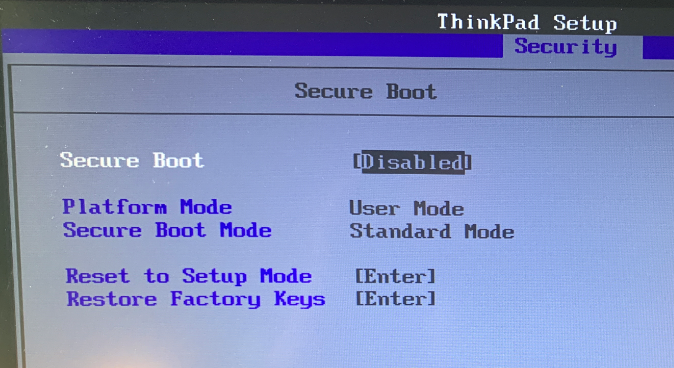
In today’s world of increasing cybersecurity threats, secure boot has become an essential aspect of any good cybersecurity program. Secure boot is a process that ensures that only trusted software is loaded into a device’s operating system, preventing unauthorized access and protecting the system from malicious attacks. This article will explore the importance of secure boot in a good cybersecurity program.

Secure boot is a critical component of a system’s security posture as it prevents attackers from injecting malicious code into the boot process. The secure boot process starts when the device is powered on, and the system checks the integrity of the firmware and operating system. The firmware checks for any unauthorized modifications or tampering, and if everything is in order, it allows the operating system to boot up. If any unauthorized changes are detected, the system will not boot, and the administrator will be alerted.

The secure boot process ensures that only trusted software is loaded into the system, thereby protecting against a wide range of attacks. Attackers often exploit vulnerabilities in the boot process to inject malware or other malicious code into the system, allowing them to gain unauthorized access or steal sensitive data. Secure boot prevents such attacks by verifying the integrity of the boot process and only allowing trusted software to load.

Secure boot also protects against rootkit attacks. A rootkit is a type of malware that is designed to evade detection by antivirus software and gain control of the system. Rootkits can be particularly dangerous as they can modify the operating system to hide their presence and allow attackers to maintain access to the system even after the malware has been detected and removed. Secure boot protects against rootkits by ensuring that only trusted software is loaded into the operating system, preventing any unauthorized modifications.

In addition to protecting against malware and rootkit attacks, secure boot also helps to protect against attacks that exploit vulnerabilities in the boot process. These types of attacks can be particularly dangerous as they can allow attackers to gain access to sensitive data or take control of the system. Secure boot ensures that the boot process is secure and that any vulnerabilities are identified and remediated before they can be exploited.

Overall, secure boot is an essential component of any good cybersecurity program. It helps to protect against a wide range of attacks, including malware, rootkits, and vulnerabilities in the boot process. By ensuring that only trusted software is loaded into the operating system, secure boot helps to prevent unauthorized access and protect sensitive data. As such, it is essential that organizations implement secure boot as part of their overall cybersecurity strategy.

digidom – Answer

Q. Who do you think our ideal customer is?

I believe that there are two types of customers that would be drawn to the products and services presented on the homesecurityheros.com website.

1. The victims of identity theft

These are the folks who’ve already been targets of identity theft and have gone through the painful process of regaining their identity. This is often a time-consuming, exhausting process that usually entails dealing with the authorities (sometimes the FBI), banks, and creditors.

One of my neighbors, a senior in his early 80s, recently went through this process and he described it as the “most traumatizing experience” of his life. I believe him.

As a cybersecurity professional, I know that the threat actors behind identity theft, as well as other scams, will stop at nothing to ruin a person’s finances.

For the victim, an incident like this can be a psychological nightmare that may take years to heal from. They may never feel sure that their devices are clean from spyware or malware. And, they may worry that the same thing could happen to them again.

The PTSD from the experience will perhaps drive them to be extra careful and protective of their identity and/or finances and thus, be drawn to buy products or use services that can bring them that peace of mind they’re looking for.

2. Concerned citizens

Concerned citizens are likely to be the website’s largest audience. These are the folks who have never been victims of identity theft, but may watch the news daily (or nightly) and are aware of the problem.

These concerned citizens may also be older, more educated adults, who know they have a lot to lose if their identity was stolen — missed mortgage, car, and recreational vehicle payments, ruined vacations, and the excruciating embarrassment of having something like this happen to them.

Concerned citizens may also be the children of older parents, or the grandkids of an aging grandma or grandpa. These protective family members may want to buy identity theft protection and credit monitoring to help shield their loved ones from financial ruin.

There may definitely more types of people interested in the website, but the two groups I described above, may be the most relevant.